Downtime Reporting Made Easy with Maximo Mobile: Simple Steps to More Reliable Data


In refineries, power plants, airports, mines, and high-throughput manufacturing, downtime is not just “minutes lost.” It is lost production, safety exposure, quality risk, and a direct hit on KPIs like availability, OEE, and MTTR. Yet in many plants, the way downtime gets recorded is still surprisingly fragile.
For years, the industry has relied on the robust desktop capabilities of EAM systems such as IBM Maximo to track these events. However, there is a fundamental disconnect between where the work happens (the field) and where the reporting happens (the office). This gap is where your data integrity goes to die.
The "Walking Time" Tax on Data
In a traditional Maximo 7.6 or MAS Manage workflow without a field-first strategy, the technician’s immediate priority is safety and containment, rightly so. They focus on Lockout/Tagout (LOTO) and securing the area. The administrative task of "reporting" the downtime becomes a secondary, or even tertiary, thought.
The real problem starts after the repair. In a large facility, traveling back to a maintenance office to access a terminal can take 10-20 minutes or more. By the time a technician logs in and navigates through the multiple tabs required to enter a Start and Stop time, they are often relying on memory.
The result? Technicians often estimate times or batch-enter data at the end of a shift. This leads to "fat-finger" errors and rounded numbers (e.g., logging exactly 60 minutes for a job that took 42). These inaccuracies cascade into your reliability metrics, rendering your MTTR and Availability reports less than trustworthy.
Shifting the Capture Point to the Field
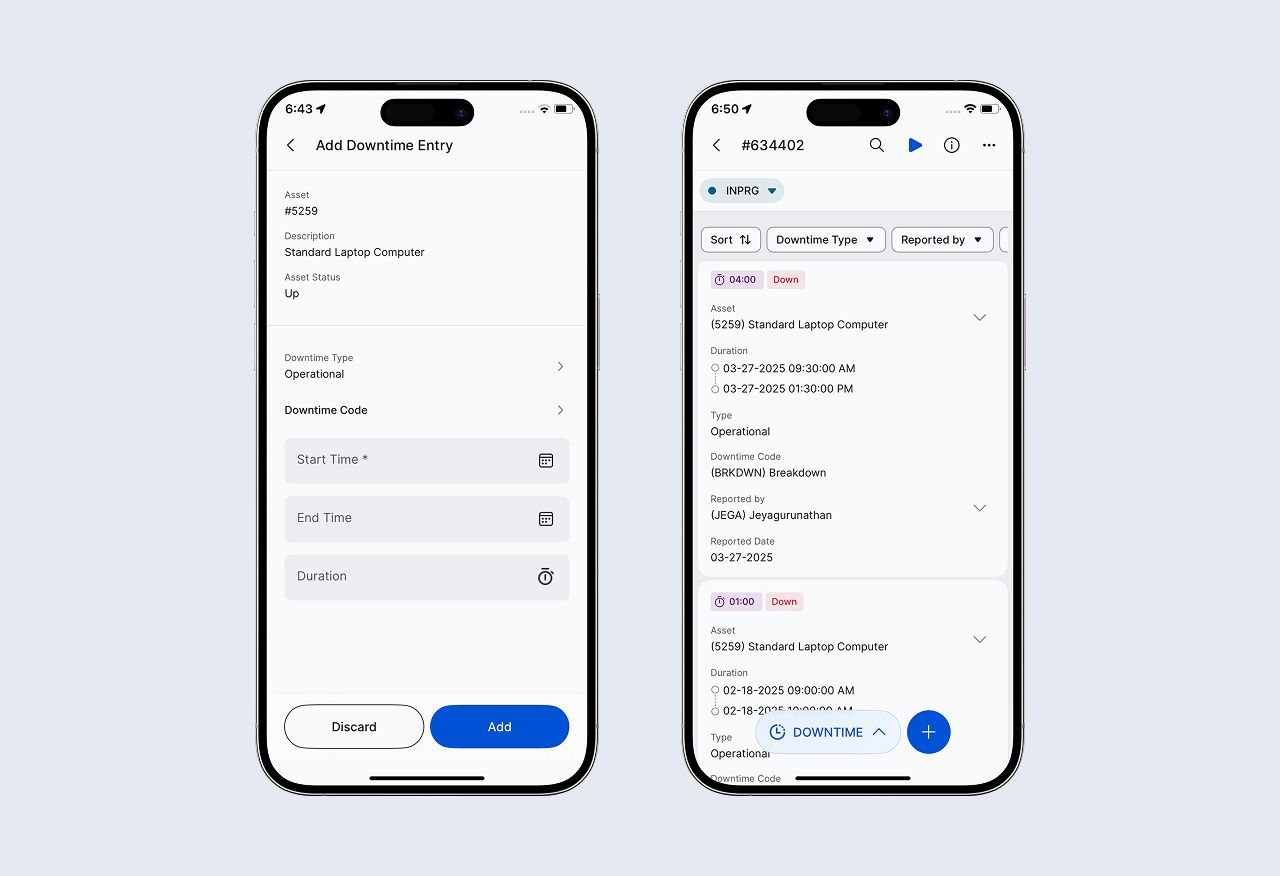
Moving the downtime logging process to a mobile interface isn't just about eliminating "walking time", it's about capturing data at the point of performance. However, success here requires a focused, simplified interface, not a shrunken-down version of the desktop view.
In mature mobile deployments, such as those utilizing the EAM360 Mobile app for Maximo, the focus shifts to three pillars of field-driven data:
-
Contextual Awareness: Maximo can capture downtime fields perfectly well on a desktop. The problem is that the person who knows the true start/stop and symptoms is in the field, and the tool is in an office.
-
Data Accuracy: Downtime type, downtime codes, production impact, and comments all matter. On a desktop, these fields can feel like “extra admin.” Under time pressure, users choose generic codes or skip details, which later makes “downtime analysis” turn into guesswork.
-
Automated Updates: Instead of forcing a technician to enter the start and end times, the system should instantly update as soon as the Start/End times are selected.
Best Practices for Implementation
A successful mobile strategy for MAS Manage isn't just about a good UI; it’s about governance without complexity.
- Refrain from "Minimizing" the Desktop: The most common failure point is trying to force every Maximo field onto a 6-inch screen. The UI must be optimized for mobile, using vertical lists and showing only the essential, context-specific fields needed for that specific asset type.
-
Keep Workflows Synchronized: The mobile submission should trigger the same backend approval workflows and validations as the desktop. The only thing that changes is the capture location, ensuring that your data remains compliant with corporate governance.
-
Real-Time Over Batch: Encourage a "capture as you go" culture. When downtime is logged instantly, the data entered into IBM Maximo is not just faster—it's actionable.
-
Offline Capability: If your plant has poor network coverage in basements, tunnels, remote yards, or inside large metal structures, the mobile still has to work. Mature Maximo mobile deployments, such as the EAM360 mobile app, treat offline capture as a normal scenario, not an exception: users record the event in the field, and the transaction syncs when connectivity returns. The app should automatically turn offline mode when there is no connectivity or poor connectivity
Summary
By shifting from a rigid, office-bound process to a native mobile capability, you aren't just making life easier for the technician. You are ensuring that the reliability data driving your multi-million dollar maintenance budget is accurate and timely. In the world of EAM, if it wasn't captured accurately in the field, it might as well not have been captured at all.


by Jeyagurunathan G
Jeyagurunathan is a junior software engineer with 2 years of experience in IBM Maximo and the EAM360 mobile app for Maximo. Combining a QA mindset, he also develops clean, user-friendly, and well-designed Android applications using Jetpack Compose, Kotlin, & the Material Design system.


